Pages

Showing posts with label Facebook. Show all posts

Friday, March 11, 2011

How to block user on facebook

How to Block User in Facebook
Manytimes on Facbook strange people send your friend request. Once you accept their fried request they can view all your photos and profile. Later you finds that your tange friend downloads your photos or send you a lot of messages and now you want to block that friend. If you do not know how to block user then you get annoyed by his/her messages.
If you are in this situation refer below steps to block friends. Once you block friend you will not appear in his search and also he can not see your profile . Depend on your privecy settings.
There are three methods which you can use to block user in facebook. You can use either of them to block user.
1.       Using Privecy Settings.

è Click on Accounts menu on top right hand side of your profile and then click on Privecy Settings.
è Now Click on Edit your List under  Block Lists. Please refer Image

è Type user name or email address and click on Block. It will block user. Refer image. You can remove blocked user by clicking Remove button.


2.       By going to user’s Profile

è First go to user’s profile whom you want to block
è Now click on Report/Block User
è It will block those user . Refer Image


3.       By using messages

è If user has send you message ever then you can go to that message and click on Report
è It will open new window
è Click Block user Refer Image


Just one condition: Please do not block me on Facebook. !!!!!!

Do you want to Impress Friends using Facebook :

Do you really like Facebook and want to get maximum benifits from it then i can refer you the best book i have ever read about Facebook. I personally have bought this book and it is awesome. It gives all information from A to Z regarding Facebook. How to find lost friend, How to play games, use all appication. This Book costs only $13.01 Facebook Me! A Guide to Socializing, Sharing, and Promoting on Facebook (2nd Edition)  After reading this book you can impress friends by showing A to Z tips and tricks about facebook.

I hope this post will help you.

Cheers

Tuesday, September 7, 2010

Make Facebook link for your Profile so your friends directly can view your profile using link. i.e. www.facebook.com\australia.bestmate

You may like to make direct link to your Facebook profile so any of your friends can use your link to go to your profile page directly instead of searching you from friend list. There are some easy steps to follow.


For this you need to first insert username (what ever you want in your link) but it must be unique. Click on accounts on your profile page. And then Account Settings. Here change your username (what ever you want in your profile link i.e. http://www.facebook.com/australia.bestmate ).


Click on Check availability. It will give you warning you can change it only once. Click on Confirm. Once it is done. You can send link to your friends to open your profile directly. Please refer Images.


I hope this post is helpful to you. Please leave your comments. You can also share this post to your facebook friends via facebook symbol below my post.

Cheers

Monday, September 6, 2010

How can i get rid of all Likes on my facebook Account ?

Many Facebook users accidently click on Likes on any group or friends. Later they can not find how to delete all or some Likes from Facebook profile.


There is very easy option to remove likes. You need to click on Accounts on your profile page and then Edit Friends. Now left had side click on All Connection. You can click on X if you want to get rid of that group or person or so on. Please refer image.


If the above method will not work then you need to manually unlike all like pages. To do it manucally first open page which you want to Unlike. Type name in search field. Once you are on that page. scroll down to bottom and you will see unlike in left hand side. click on Unlike. Please refer image for refrence.


I hope this post will help you. Please leave your comments if you think this is helpful post. You can also share this post to all your facebook friends using Facebook icon below my post.

Do you have too Many password to remember ? I use and personally recommend.

RoboForm: Learn more...

Good Luck

Friday, September 3, 2010

How to change default name on Facebook ?

Hi There,

Some Facebook user like to change their name (default name) which they used when they create Facebook account but can not figure out how ? Here are some simple steps which you can follow to change username on facebook.

Click on Accounts and then Accounts Settings on your Facebook Home Page. Please refer image.


Then clcik on Name and Change. Here change your name what ever you want to display as your name. Please refer Image.


Accept condition and click OK. Please refer Image.


Please leave your comment here if this post help you to solve your problem. You can send me an email at pcservice@live.com.au for any computer related problem. I will provide solution for free.

Cheers

Tuesday, August 31, 2010

How to Control who is allowed to see my wall or activities on Facebook

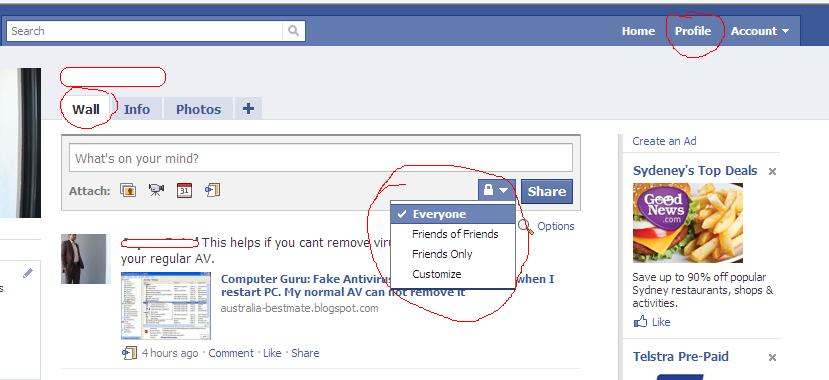
Hi Friends, many facebook user wants to hide there wall or activities from being viewed by other facebook users. It is very simple to change settings. you have four option who can view your wall or activities and the options are only me, friends, friends and their friends or everyone.
To change settings click on your profile Tab then click on Wall. Now on Wall page you will see small lock under whats in your mind. and you can change settings there.  this setting is for your Wall.


Now to stop other users to see your facebook activities such as if you join any group or you like any thing. to change this settings click on account tab on your profile and then click on Application settings. Here you can change settings for each application.


Still can not solve this problem ? Need Professional Help. CLICK HERE for more information.

I hope this will help you. Please Post your comments here if you will find this helpful. i will appreciate your comments. You can also share this post on facebook to your friends using facebook button below my post.